
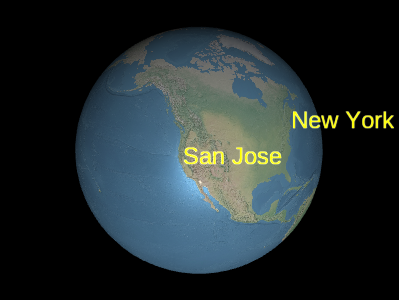
标签示例
使用
LabelCollection#add 和 LabelCollection#remove 来添加和移除标签。
Performance:
为了获得最佳性能,建议使用少量集合,每个集合包含多个标签,而不是多个集合,每个集合只有少量标签。避免集合中的某些标签每帧都更改而其他标签不更改;相反,为静态标签创建一个或多个集合,为动态标签创建一个或多个集合。
| Name | Type | Description | ||||||||||||||||||||||||||||||||
|---|---|---|---|---|---|---|---|---|---|---|---|---|---|---|---|---|---|---|---|---|---|---|---|---|---|---|---|---|---|---|---|---|---|---|
options |
object |
optional
包含以下属性的对象:
|
Example:
// 创建包含两个标签的标签集合
const labels = scene.primitives.add(new Cesium.LabelCollection());
labels.add({
  position : new Cesium.Cartesian3(1.0, 2.0, 3.0),
  text : 'A label'
});
labels.add({
  position : new Cesium.Cartesian3(4.0, 5.0, 6.0),
  text : 'Another label'
});
Demo:
See:
Members
blendOption : BlendOption
-
Default Value:
BlendOption.OPAQUE_AND_TRANSLUCENT
0, the
approximate depth test is always applied. When set to Number.POSITIVE_INFINITY, the
approximate depth test is never applied.
This setting only applies when a label's
Label#disableDepthTestDistance value would
otherwise allow depth testing—i.e., distance from the camera to the label is less than the
label's Label#disableDepthTestDistance value.
为图元中的每个绘制命令绘制边界球。
-
Default Value:
false
LabelCollection#get 配合使用以遍历集合中的所有标签。
modelMatrix : Matrix4
Transforms.eastNorthUpToFixedFrame 返回的矩阵。
-
Default Value:
Matrix4.IDENTITYExample:
const center = Cesium.Cartesian3.fromDegrees(-75.59777, 40.03883);
labels.modelMatrix = Cesium.Transforms.eastNorthUpToFixedFrame(center);
labels.add({
  position : new Cesium.Cartesian3(0.0, 0.0, 0.0),
  text     : 'Center'
});
labels.add({
  position : new Cesium.Cartesian3(1000000.0, 0.0, 0.0),
  text     : 'East'
});
labels.add({
  position : new Cesium.Cartesian3(0.0, 1000000.0, 0.0),
  text     : 'North'
});
labels.add({
  position : new Cesium.Cartesian3(0.0, 0.0, 1000000.0),
  text     : 'Up'
});-
Default Value:
true
Label#heightReference value
of HeightReference.CLAMP_TO_GROUND or HeightReference.CLAMP_TO_TERRAIN are depth tested
against three key points. This ensures that if any key point of the label is visible, the whole
label will be visible. When set to 0, this feature is disabled and portions of a
label behind terrain be clipped.
This setting only applies when a labels's
Label#disableDepthTestDistance value would
otherwise allow depth testing—i.e., distance from the camera to the label is less than the
labels's Label#disableDepthTestDistance value.
Methods
add(options) → Label
Performance:
Calling add is expected constant time. However, the collection's vertex buffer
is rewritten; this operations is O(n) and also incurs
CPU to GPU overhead. For best performance, add as many billboards as possible before
calling update.
| Name | Type | Description |
|---|---|---|
options |
Label.ConstructorOptions | optional A template describing the label's properties as shown in Example 1. |
Returns:
Throws:
-
DeveloperError : This object was destroyed, i.e., destroy() was called.
Examples:
// Example 1:  Add a label, specifying all the default values.
const l = labels.add({
  show : true,
  position : Cesium.Cartesian3.ZERO,
  text : '',
  font : '30px sans-serif',
  fillColor : Cesium.Color.WHITE,
  outlineColor : Cesium.Color.BLACK,
  outlineWidth : 1.0,
  showBackground : false,
  backgroundColor : new Cesium.Color(0.165, 0.165, 0.165, 0.8),
  backgroundPadding : new Cesium.Cartesian2(7, 5),
  style : Cesium.LabelStyle.FILL,
  pixelOffset : Cesium.Cartesian2.ZERO,
  eyeOffset : Cesium.Cartesian3.ZERO,
  horizontalOrigin : Cesium.HorizontalOrigin.LEFT,
  verticalOrigin : Cesium.VerticalOrigin.BASELINE,
  scale : 1.0,
  translucencyByDistance : undefined,
  pixelOffsetScaleByDistance : undefined,
  heightReference : HeightReference.NONE,
  distanceDisplayCondition : undefined
});
// Example 2: Specify only the label's cartographic position,
// text, and font.
const l = labels.add({
position : Cesium.Cartesian3.fromRadians(longitude, latitude, height),
text : 'Hello World',
font : '24px Helvetica',
});See:
| Name | Type | Description |
|---|---|---|
label |
Label | The label to check for. |
Returns:
See:
Once an object is destroyed, it should not be used; calling any function other than
isDestroyed will result in a DeveloperError exception. Therefore,
assign the return value (undefined) to the object as done in the example.
Throws:
-
DeveloperError : This object was destroyed, i.e., destroy() was called.
Example:
labels = labels && labels.destroy();See:
get(index) → Label
LabelCollection#length to iterate over all the labels
in the collection.
Performance:
Expected constant time. If labels were removed from the collection and
Scene#render was not called, an implicit O(n)
operation is performed.
| Name | Type | Description |
|---|---|---|
index |
number | The zero-based index of the billboard. |
Returns:
Throws:
-
DeveloperError : This object was destroyed, i.e., destroy() was called.
Example:
// Toggle the show property of every label in the collection
const len = labels.length;
for (let i = 0; i < len; ++i) {
  const l = billboards.get(i);
  l.show = !l.show;
}
See:
If this object was destroyed, it should not be used; calling any function other than
isDestroyed will result in a DeveloperError exception.
Returns:
Performance:
Calling remove is expected constant time. However, the collection's vertex buffer
is rewritten - an O(n) operation that also incurs CPU to GPU overhead. For
best performance, remove as many labels as possible before calling update.
If you intend to temporarily hide a label, it is usually more efficient to call
Label#show instead of removing and re-adding the label.
| Name | Type | Description |
|---|---|---|
label |
Label | The label to remove. |
Returns:
true if the label was removed; false if the label was not found in the collection.
Throws:
-
DeveloperError : This object was destroyed, i.e., destroy() was called.
Example:
const l = labels.add(...);
labels.remove(l);  // Returns true
See:
Performance:
O(n). It is more efficient to remove all the labels
from a collection and then add new ones than to create a new collection entirely.
Throws:
-
DeveloperError : This object was destroyed, i.e., destroy() was called.
Example:
labels.add(...);
labels.add(...);
labels.removeAll();