
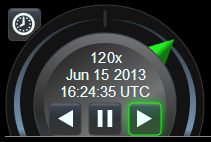
Animation 控件
Animation 控件提供用于播放、暂停和反转的按钮,以及 当前时间和日期,周围环绕着用于控制动画速度的“shuttle ring”。
“shuttle ring”概念源自视频编辑,通常 “jog wheel”可以旋转以逐个帧缓慢移动动画,而 周围的 shuttle ring 可以旋转以控制快播的方向和速度。 Cesium 通常将时间视为连续的(不分解为预定义的动画帧), 因此此控件不提供 jog wheel。相反,shuttle ring 能够实现快速和 非常慢的播放。点击并拖动 shuttle ring 指针本身(上图中以绿色显示), 或在环区域的其余部分点击以将指针推动到该方向的下一个预设速度。
Animation 控件还提供“realtime”按钮(位于左上角),使 动画时间与最终用户的系统时钟保持同步,通常显示 “今天”或“现在”。此模式在
ClockRange.CLAMPED 或
ClockRange.LOOP_STOP 模式下不可用,如果当前时间在 Clock 的 startTime 和 endTime 之外。
| Name | Type | Description |
|---|---|---|
container |
Element | string | 将包含此控件的 DOM 元素或 ID。 |
viewModel |
AnimationViewModel | 此控件使用的视图模型。 |
Throws:
-
DeveloperError : 文档中不存在 id 为 "container" 的元素。
Example:
// 在 HTML head 中,包含指向 Animation.css 样式表的链接,
// 并在 body 中包含:<div id="animationContainer"></div>

const clock = new Cesium.Clock();
const clockViewModel = new Cesium.ClockViewModel(clock);
const viewModel = new Cesium.AnimationViewModel(clockViewModel);
const widget = new Cesium.Animation('animationContainer', viewModel);

function tick() {
    clock.tick();
    requestAnimationFrame(tick);
}
requestAnimationFrame(tick);
See:
Members
获取父容器。
readonly viewModel : AnimationViewModel
获取视图模型。
Methods
更新控件以反映任何修改后的 CSS 主题规则。
Example:
// 切换到 cesium-lighter 主题。
document.body.className = 'cesium-lighter';
animation.applyThemeChanges();
销毁动画控件。如果从布局中永久移除控件,应调用此方法。
Returns:
如果对象已被销毁则为 true,否则为 false。
调整控件大小以匹配容器尺寸。
当容器大小改变时应调用此函数。